
In the bird's-eye view article (Part 0) we established that the bid request is the commercial definition of an ad opportunity. Now we dive into how that opportunity is actually sold. How bids are requested, how the auction is structured, and which systems make those decisions – seen from the publisher's perspective.
This is the engine room of the auction.
If the bid request is the description of the ad opportunity, then the auction and the control layer are how that opportunity actually gets sold. This layer governs execution: how and where the auction runs, which bidders participate, how much time they have, and who controls what.
This article explains the architecture of a header bidding auction and introduces the technical structures and decisions that shape every single auction. We are not looking at the demand platforms themselves, such as SSPs/DSPs and their relationship to Prebid (yet), but solely at the publisher's configuration options and the on-page auction.
A single auction often involves:
Each bidder receives one or more bid requests, depending on which ad units they are mapped to. Prebid.js has a really good interactive demo. We will borrow from it to illustrate how an auction is set up. Keep in mind that the code below is far from the full required setup – it is various excerpts from the complete code on the demo page.
Let's assume you have already defined a simple ad unit on your page with Google Publisher Tags (GPT.js). In this example we call the slot div-1:
<head>
  <script async src="https://securepubads.g.doubleclick.net/tag/js/gpt.js"></script>
  <script>
    googletag.cmd.push(function() {
      googletag.defineSlot('/19968336/header-bid-tag-1', [[300, 250]], 'div-1')
        .addService(googletag.pubads());
      googletag.pubads().enableSingleRequest();
      googletag.enableServices();
    });
  </script>
</head>
<body>
  <div id='div-1' style="min-height:250px;">
    <script type='text/javascript'>
      googletag.cmd.push(function() {
        googletag.display('div-1');
      });
    </script>
  </div>
</body>
Now we configure Prebid.js to participate in the auction. It starts with including the Prebid.js library and defining the corresponding ad unit in JavaScript:
<head>
  <script async src="https://cdn.jsdelivr.net/npm/prebid.js@latest/dist/not-for-prod/prebid.js"></script>
  <script>
    var adUnits = [{
      code: '/19968336/header-bid-tag-1',
      mediaTypes: {
        banner: {
          sizes: [[300, 250]]
        }
      },
      bids: [{
        bidder: 'appnexus',
        params: {
          placementId: 'XXXXXXX'
        }
      }]
    }];
  </script>
</head>
Here is what happens:
code value maps to the GPT ad slot.mediaTypes.banner.sizes defines the desired size (300x250) so it matches the size mapping in GPT.bids array we specify one or more bid adapters – in this case AppNexus (Xandr) – and pass along the placementId that the bidder in question requires.
This structure is repeated per ad unit. When you scale to 10-15 bidders across 5-10 ad units, the configurations quickly become large and unwieldy – especially when each bidder has different params. That is one of the reasons Header Bidding Management (HBM) solutions like wrappers have gained ground since Prebid launched back in 2015.
Prebid.js then uses this config to send bid requests out to each adapter, generate OpenRTB-style requests and coordinate the auction flow.
These are some of the most important dials the publisher can turn in the Prebid control layer, and most of them are configured in pbjs.setConfig(). The full set of configuration options is quite extensive and granular. If you are up for it, the documentation is here.
Example of the most common settings:
pbjs.setConfig({
  bidderTimeout: 1000,
  useBidCache: true,
  priceGranularity: {
    buckets: [
      { max: 20, min: 0, increment: 0.01, precision: 2 },
      { max: 99, min: 21, increment: 1, precision: 2 }
    ]
  },
  auctionOptions: {
    secondaryBidders: ["xandr", "criteo", "triplelift", "pubmatic"]
  },
  currency: {
    adServerCurrency: "USD",
    defaultRates: {
      USD: { EUR: 0.92, DKK: 6.84, GBP: 0.8 }
    }
  },
  floors: {
    data: {
      currency: "DKK",
      default: 0.07,
      schema: { fields: ['mediaType'] },
      values: { '*': 0.07 }
    }
  }
});
What each setting does:
And the configuration above only scratches the surface of what is possible in Prebid.js.
To understand how much control Prebid provides in its configs, let's walk through the most important timeout layers. Each layer affects its own part of the flow, and together they determine how reliable, fast and revenue-effective your auctions can be. The diagram below summarizes timeouts in Prebid.js and Prebid Server: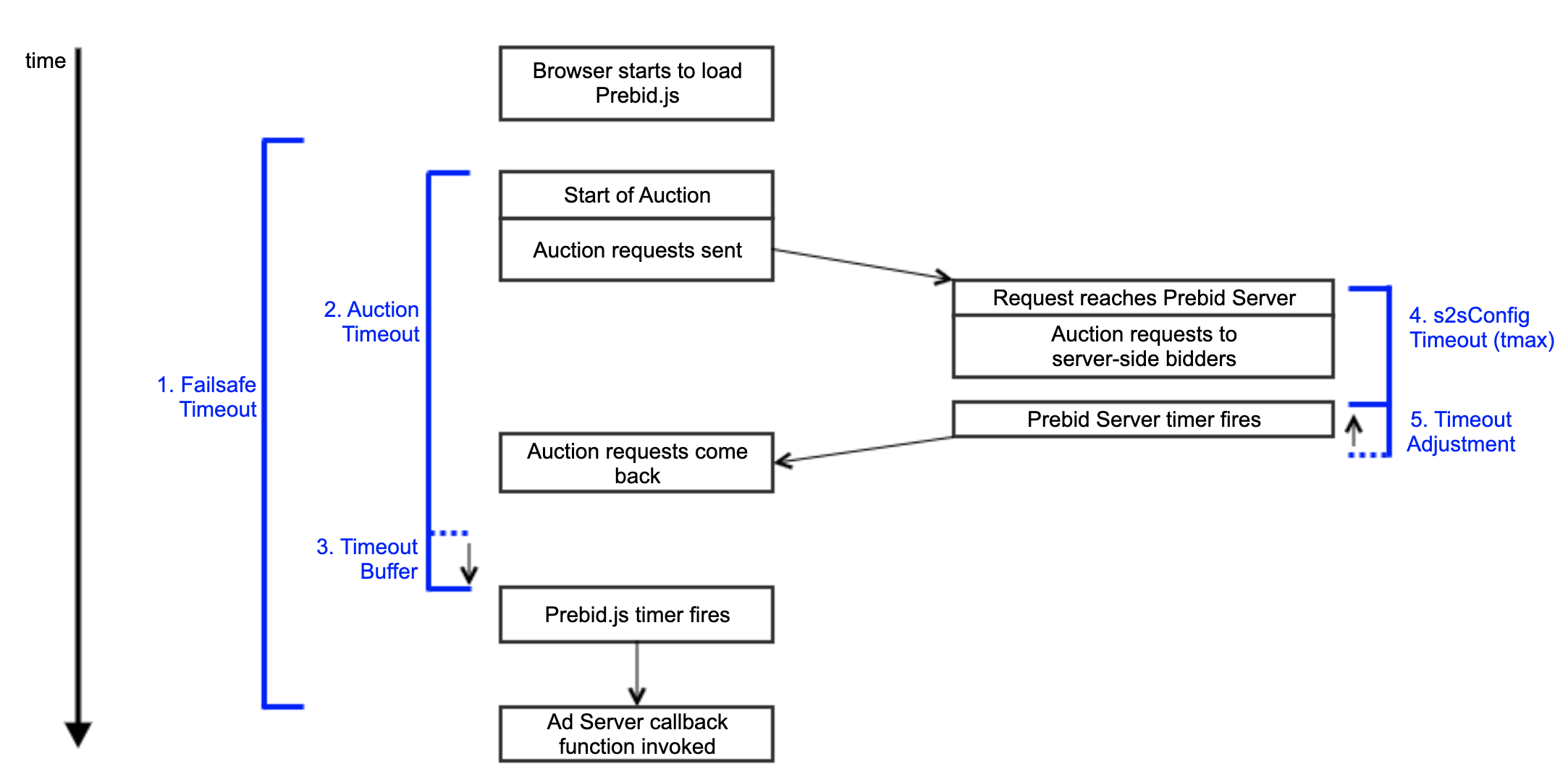 Prebid timeout flow
For a more detailed walkthrough, Prebid's timeout documentation is here, but below is an overview:
setTimeout() that publishers should consider establishing after the Prebid.js code has loaded. It is a safety net that calls the ad server callback if something goes wrong. In all normal scenarios, Prebid.js will already have called the callback before this timeout is reached. The value should be significantly higher than the auction timeout.s2sConfig.timeout to a value lower than the auction timeout. How much lower depends on users' average network latency, but it should probably be in the range of 50-75% of the auction timeout. The value is sent in Prebid Server's OpenRTB as tmax.tmax value has expired. See Prebid Server's timeout reference for details.
All these layers work together, but each layer is tuned separately. And that is precisely Prebid's strength: You can turn the control as tight or loose as your stack requires.
A Prebid auction can primarily run in two ways: directly in the user's browser (client-side) or on an external infrastructure endpoint (server-side).
Client-side:
Server-side:
Most modern publisher setups use a hybrid model, where some bidders are sent through Prebid.js (to preserve cookie-based identity) and others through Prebid Server (for performance reasons, or because the bidder does not support client-side execution). That gives the best of both worlds: identity and granular control from the client side, and the server side's scale and efficiency – all without slowing down the user experience.
The auction and the control layer are the execution layer that determines how the bid request turns into real-time decisions. From how ad units are configured in GPT and Prebid.js, to how bidders are selected and mapped to impressions, to how timeouts, floors, currencies and secondary settings are defined – everything runs through this control logic.
It also determines where the auction runs: in the browser (client-side), on an external server (server-side) or both. And that choice directly affects latency, identity match rates and flexibility.
Understanding this layer helps explain:
Ultimately, header bidding is not just a technology. It is a coordination system. And the auction and the control layer are where all the pipes meet.
That was the first article in this nine-part series: What is actually hiding in a bid request?
Let us help you get the most out of your display campaigns.